What is Edge Cache?
BionicWP offers Edge Cache as a free performance feature across all plans. This feature utilizes our global network of edge servers to deliver cached pages and static assets for your WordPress sites.
Benefits of Edge Cache
Edge Cache provides performance improvements, especially in terms of your site’s Time to First Byte (TTFB), by serving page cache directly from the closest server available to a site’s visitors. This cache is served from BionicWP’s four origin datacenters, and over 24 edge datacenters, giving sites a total of 28 Point of Presence (PoP) locations that are continuously expanding.
- Improved performance: Edge Cache enhances your site’s performance by reducing the distance that requests have to travel. It serves page cache directly from the nearest server to your site’s visitors, resulting in faster page load times and improved Time to First Byte (TTFB). This improved performance enhances user experience, reduces bounce rates, and positively impacts your site’s Core Web Vitals.
- Reduced resource utilization: By caching requests on our edge servers, Edge Cache decreases the load on your site’s origin server. This reduction in requests to the origin server improves overall performance and reduces resource consumption.
- Increased availability: Edge Cache ensures the availability of your site through graceful failover. Even if your site encounters issues, requests can still be served from the edge servers. This guarantees that your site remains accessible to users, even during situations like plugin and theme conflicts.
- Compatibility: Similar to Batcache, Edge Cache is compatible with dynamic requests that adhere to WordPress’ best practices. It ensures that cached pages are not served when an uncached response is required. This compatibility extends to popular eCommerce solutions like WooCommerce, guaranteeing that checkout flows and cart requests are not cached. It’s important to note that traffic directed to a site’s Edge Cache is not currently logged in the standard web server logs.
Enabling and Disabling Edge Cache
Navigate to https://my.bionicwp.com/
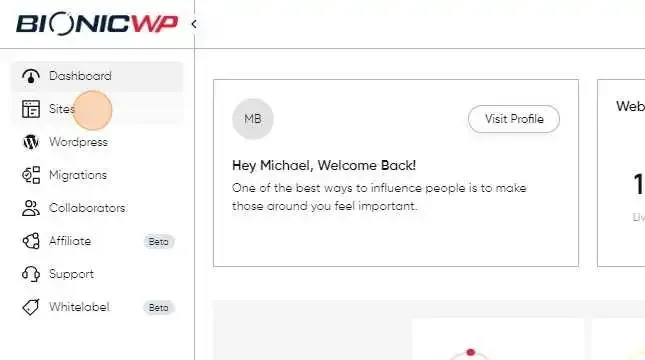
Go to "Sites"
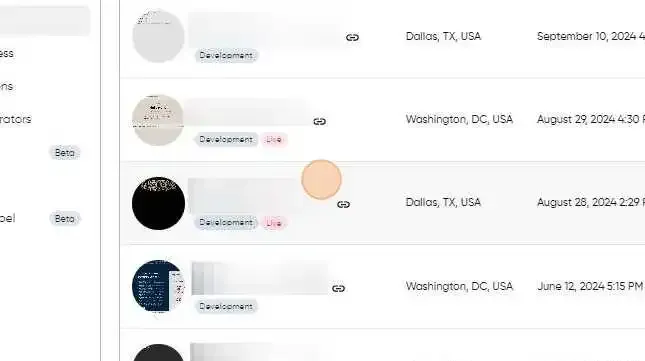
Select the site you want to enable cache for:
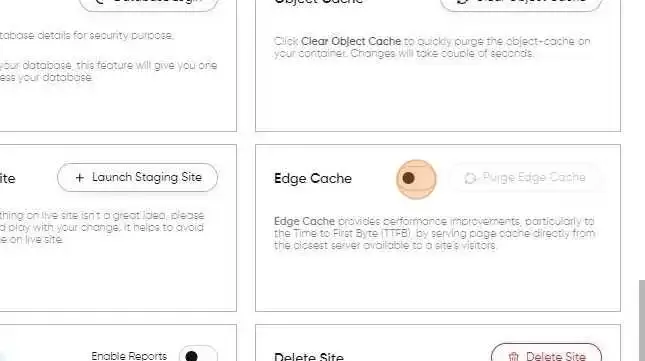
Click this checkbox to Enable to Disable 'Edge cache'
Purging / Flushing Edge Cache
Navigate to the “Edge Cache” section under “Site Details” and click "Purge Edge Cache"
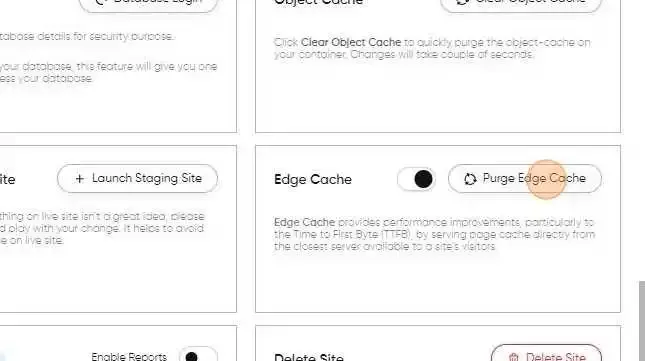
Clicking the Purge Edge Cache will clear the current cache from our edge servers. Note that performance will be affected while cache rebuilds and it is recommended to use this tool sparingly.
Checking the Status of Edge Cache
Once Edge Cache is enabled, it requires some time and multiple site visits for the cache to be built and served from the edge servers. To monitor the status of Edge Cache, you can check for the x-ac response header using your browser’s developer tools, or the shell command curl -LI https://your-example-domain/, and other methods. It’s important to note that if you are currently logged into the backend (WP-Admin) of your site, both Batcache and Edge Cache will be disabled for your web browser’s session. Here are a few examples of these headers: x-ac: 3.vie _atomic_dca HIT x-ac: 2.den _atomic_dfw BYPASS x-ac: 1.ewr _atomic_dca MISS The value of the x-ac header can be HIT, EXPIRED, UPDATING, MISS, or BYPASS.
- HIT: The page was served from Edge Cache.
- EXPIRED: Response found in the cache but has passed the cache TTL. The response is returned then the item is removed from the cache.
- UPDATING: A request is currently updating the cached asset from the site’s origin server via a held lock to prevent multiple ‘misses’ for the same request.
- MISS: There was not an Edge Cache hit. This may be due to something disabling or preventing Batcache from working. Or, the page may not have had enough recent visits to populate the cache on the specific edge server the visitor connected to.
- BYPASS: Edge Cache is not enabled. If the x-ac header’s value is HIT, EXPIRED, UPDATING, or MISS, this indicates that Edge Cache is enabled. If the header shows BYPASS, this means that Edge Cache is disabled.
Common Caching Issues
Any configurations or issues that disable or disrupt Batcache will similarly impact Edge Cache functionality. It’s important to be aware that if you are logged into the backend (WP-Admin) of your site, both Batcache and Edge Cache will be disabled for your web browser’s session. Here are some examples of configurations or issues that can prevent optimal caching or potentially break caching entirely: Cookies Certain plugins may attempt to set cookies on each page load, especially those that leverage server-side cookies. This will prevent Batcache and Edge Cache from storing and serving cache.
- PHPSESSID server-side cookie AKA the “session cookie”, leverages PHP to store session IDs on the server side. Initiated via the session_start() function.
- Other set-cookie implementations that attempt to set a cookie on every request. Initiated via the setcookie() function.
Custom Cache Headers
Plugins and custom code may attempt to modify cache response headers. The following examples, when set, will prevent caching.
- pragma: no-cache
- cache-control: no-cache
- cache-control: max-age=0
Other Functions & Snippets
The following are additional examples of code that can prevent Batcache and Edge Cache from working as expected.
- batcache_cancel()
- $batcache->max_age = 0;
- $batcache['max_age'] = 0;
- session_start()
- nocache
- nocache_headers()
- x-cache
- wp_cache_flush()